Tips for Avoiding New Modes of Fraud Through WhatsApp
Again and again, phishing cases have been rampant again, cyber criminals always have new ways or new modes that they use to launch their actions. It's as if the criminals never run out of ideas to create a new mode. Recently, in Indonesia, a new mode has emerged where criminals disguise themselves as couriers to one of the employees of a company who launches their actions via Whatsapp. Then how do you avoid and know that this is an attempt at crime?
In recent days there has been a lot of talk about fraud with a new mode. This new mode is carried out via Whatsapp, where fraudsters will impersonate couriers and employees of an agency that has an application.
The fraudster posing as a courier will ostensibly send a file that he considers to be a photo of your package, while the file is an APK type not JPG, PNG, JPEG as it should be for images or photos. The APK type file sent by the scammer when you open it will automatically install an application which is used by the scammer to obtain your personal data such as photos, credentials and others on your cellphone.
Fraudsters disguised as employees of an agency, say provider A, which has an application on the cellphone to monitor credit, quota, and buy quota. The fraudster will send an APK type file on the pretext of telling you to update your provider A application using the file sent via whatsapp. So that when you press the file and install it, the application can be used by fraudsters to get your personal data such as photos, credentials and other data on your cellphone.
Then how to avoid phishing with this new mode that is currently rampant?
1. Check the Sender Number
You should first check the number of the file sender, you can check the number using an application like getcontact, which is useful for finding out who the sender is. When you check the number and don't find the tagname it means that it could be used just to cheat, on the other hand if you find the tagname but a lot of cheater words, it means that the number is indeed a cheater number. By knowing the tagname you can conclude for yourself whether you need to open the file or not.
2. View File Format
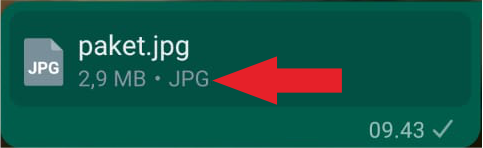
You should check the format of the submitted file, as in the image above. If the file sent is really an image then the format indicated by the arrow is JPG, JPEG, PNG, TIFF, SVG, GIF. But if the file sent is in APK format you need to be vigilant, because the APK format indicates that the file is an application.
3. Update Apps Only Through Play Store or IOS Store
Always use an official platform to update an application such as the Play Store or IOS Store, because applications sent via whatsapp are not guaranteed security especially if the application is sent by a number you don't know. What you need to know is that an agency will not send messages for application updates via whatsapp and also send the application via whatsapp as well.
Reference:
Want to know more information, please visit our website at:
Don't forget to follow our other social media
Instagram : hdnmetatech
linkedin : https://www.linkedin.com/company/herdina-metatech-sinergi-corp
Facebook : Herdina Metatech Sinergi Corp